Below are six applications I used to create video slideshows with the same body of photographs. Each video was exported at 520p, with the exception of one which was 480p. All the applications have advantages and limitations, but all produce a solid result. All the applications are designed to provide an easy and pleasant user interface, but vary in terms of flexibility. Encoding by the web host provider may have some bearing on the final product.
IMOVIE BY APPLE, INC
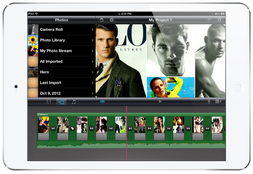
iMovie is an original Apple product and is made for the iPhone and iPad. Apple consistently provides a high quality product with quality results.
Pros iMovie offers an easy user interface, with drag and drop features that sync clips together automatically. The user can import photos, videos, theme music, sound effects, and songs from the library. You can record video and audio narrations, which can be added directly to your project. iMovie exports to 360p, 540p, HD 720p, HD 1080p. Cons The user is limited when using titles and transitions. The end quality is great, but they are generated by themes that Apple provides for various visual effects. There are 8 themes overall. There is also limited editing capability when working with video and audio clips. You can split clips, but this is not readily apparent to the user. iMovie does not sync with third party services like Dropbox. IMovie is $4.99. |
IMOVIE
|
PHOTO SLIDESHOW DIRECTOR HD BY SHENZHEN SOCUSOFT, CO., LTD
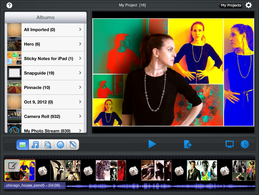
Photo Slideshow Director HD is a great option for those who are looking for a way to create fabulous slideshows with photos.
Pros Photo Slideshow exports to 360p, 540p, HD 720p, and HD 1080p. Projects can be saved to the camera library, Dropbox, Skydrive, and by Wi-Fi transfer. P.S.D. offers a range of transitions and themes, and the user can add filters and effects to photos, as well as titles and subtitles. Cons The application is limited to photos only (although this is not necessarily a weakness, since the app is not designed to feature video). The app does not access your camera for on-the-spot photos. You can access your own music, but the app does not offer any soundtracks or effects. The app is $3.99 in the App Store and there are no hidden costs for additional features. |
PHOTO SLIDESHOW DIRECTOR HD
|